monsterbrain
A brain for you and your AI agents – one window that shows a knowledge folder the way it is meant to be read: the file tree on the left, the file rendered in the middle, links and metadata on the right – and a change view that shows what your agents changed, rendered for the file type.
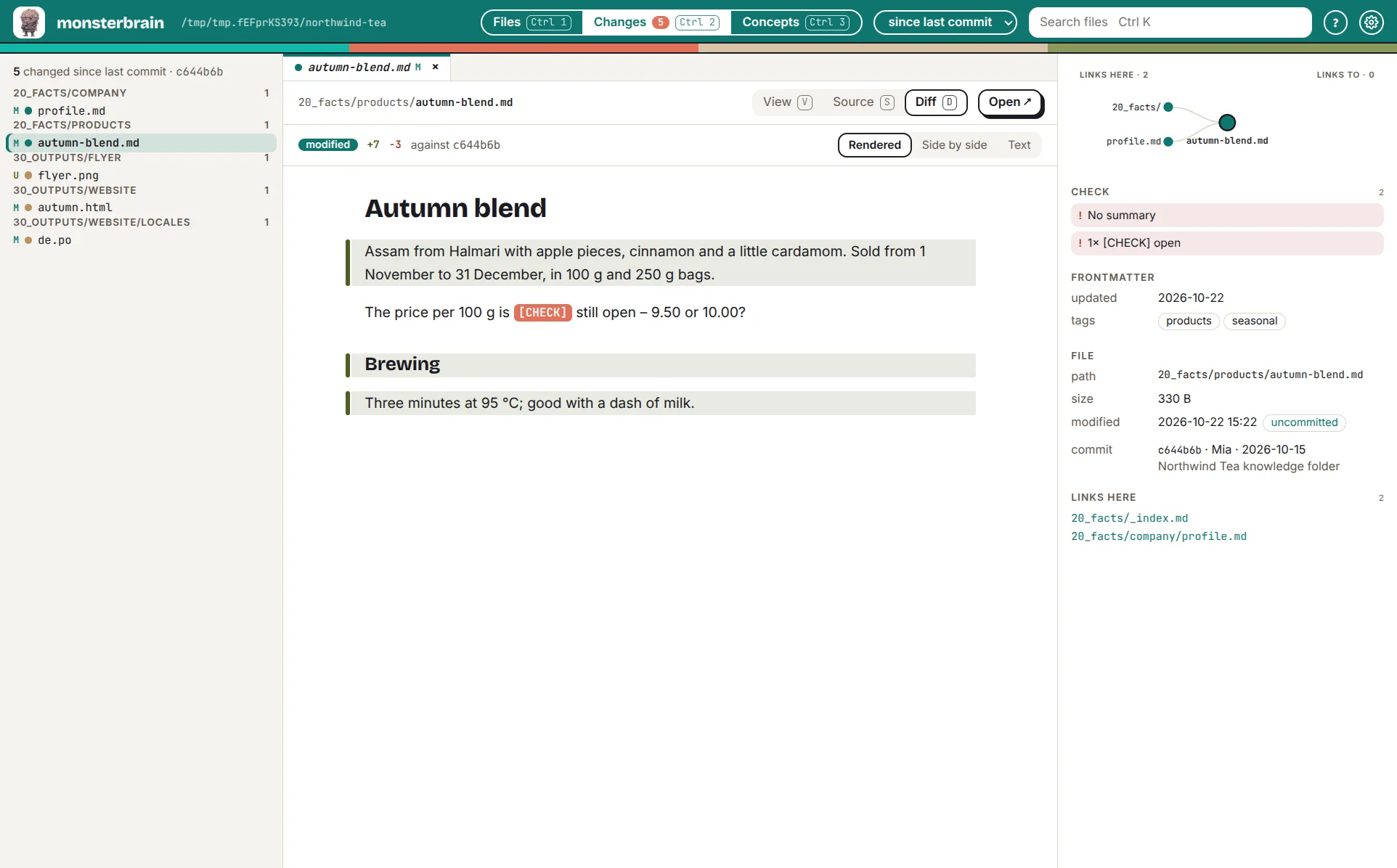
The change view: what the agent changed in a Markdown file, rendered – changed paragraphs marked.
Why monsterbrain
AI agents write a lot, in many places and many formats: Markdown notes, HTML outputs, translations, code. Following their work means an editor for one file, a browser for the next, a diff tool for the third – and still missing what changed in between. monsterbrain puts all of it into one window.
Everything rendered. Markdown, HTML,
.potranslations, code, images and PDFs show the way they are meant to be read, not as raw text.See what changed. The change view lists every file changed since a chosen point and opens its diff – rendered before and after, not only text.
The folder stays yours. monsterbrain reads plain files and Git. No database, no import, no structure it forces on you (The folder structure stays ... (DEC_STRUCTURE_UNCHANGED)).
Claude in the loop. Claude opens files, highlights passages and shows its changes in the app; the app hands work back to Claude (Claude controls the app thr... (DEC_CLAUDE_MCP)).
Reviews where you read. With deciwa you give feedback right on the rendered file.
What you can do
Read the folder |
tree, tabs, views per file type, view / source / diff – Files |
Check the metadata |
frontmatter, links and backlinks, and warnings like broken links or missing summaries – Files |
See what changed |
everything since the last commit, today, this week or this month – Changes |
Follow concepts |
all concepts by title, with their folder and the files they produced – Concepts |
Work with Claude |
Claude steers the window, the window hands work to Claude – Claude |
Extend it |
extensions add views, panels and commands – Extensions |
How a session goes
Open your folder – monsterbrain opens the last one, by default
~/brain.Let the agents work – Claude or another agent changes files in the folder.
See what changed –
Ctrl 2lists the changes;jandkstep through them, each diff rendered for its type.Review – read, give feedback with deciwa, open the file in your editor where you want to change it yourself.
Hand back – Claude picks up the feedback and shows its next changes in the app.
monsterbrain shows; it does not edit and keeps no state of its own about what you did (monsterbrain keeps no state... (DEC_NO_INTERACTION_STATE)).
Not monsterbrain |
Who does it |
|---|---|
Editing files |
your editor, your agents |
Review, approval, “seen” and “done” |
|
Testing code against decisions |
quawa, normal tests |
Managing facts and generating views from them |
faktwerk |
Where it runs
monsterbrain is a prototype and not freely available yet.
Status |
|
|---|---|
Linux desktop |
prototype, in daily use |
Windows, macOS |
later – installers with electron-builder |
Server mode in the browser, for teams |
later |
What comes when: Roadmap. How monsterbrain is built: Technical overview.